---
updatedAt: 2026-11-11T21:43:31.000Z
agentTools:
projectIndex: https://developer.i-payout.com/llms.txt
---
# How to Set Up Webhooks
Setting up webhooks for i-payout involves the following steps:
**[Step 1: Authenticate](#step-1-authenticate)**: Obtain an API token by validating your credentials.
**[Step 2: Create Webhook](#step-2-create-webhook)**: Register a new webhook to receive notifications.
**[Step 3: Activate Webhook](#step-3-activate-webhook)**: Activate the webhook subscription.
**[Step 4: Verify Webhook Signatures](#step-4-verify-webhook-signatures)**: Ensure the authenticity and integrity of webhook notifications.
 ## API Endpoints Used
In this guide, you will use the following API endpoints:
Below, you will go through the necessary API calls to achieve the steps above within the i-payout system.
### Recipe
You can also follow our recipe by clicking the link below:
## Step 1: Authenticate
To start using i-payout solutions, you will need to authenticate with your API Token. Refer to the [Get a Token](https://developer.i-payout.com/docs/get-a-token) guide to learn how to:
## Step 2: Create Webhook
To receive real-time notifications about various events, you need to set up webhooks. Use the [Create Webhook](https://developer.i-payout.com/reference/create-webhook) endpoint to create a webhook subscription. Below, you will find an example request to create a webhook:
```bash Request
curl --request POST \
--url "https://merchantapi.testewallet.net/api/v1/webhooks" \
--header 'Authorization: Bearer ' \
--header 'X-MerchantId: ' \
--header 'accept: application/json' \
--header 'content-type: application/*+json' \
--data '{
"event": "PAYMENT.COMPLETED",
"url": "https://yourwebhookurl.com/notification",
"description": "Webhook for payment completion"
}'
```
```json Response
{
"isSuccess": true,
"message": "Webhook created successfully",
"statusCode": 200,
"logIdentifier": "xyz789hij012",
"data": {
"webhookToken": "webhooktoken123",
"event": "PAYMENT.COMPLETED",
"url": "https://yourwebhookurl.com/notification",
"status": "active"
}
}
```
### Webhook Event Uniqueness
Each webhook must subscribe to a unique set of events. You cannot create two or more webhooks that subscribe to the same list of events. If an existing webhook already covers all available events, you will not be able to create another webhook until you modify its event subscriptions
### Available webhook events:
* `CUSTOMER.CREATED`
* `CUSTOMER.UPDATED`
* `CUSTOMER.STATUS.UPDATED`
* `CUSTOMER.BANK.CREATED`
* `CUSTOMER.BANK.UPDATED`
* `PAYMENT.CREATED`
* `PAYMENT.STATUS.UPDATED`
* `TRANSFER.CREATED`
* `TRANSFER.STATUS.UPDATED`
* `CUSTOMER.SUBSCRIPTION.CREATED`
* `CUSTOMER.SUBSCRIPTION.STATUS.UPDATED`
* `CUSTOMER.PREPAIDCARD.ORDERED`
* `CUSTOMER.PREPAIDCARD.REPLACED`
* `PAYOUT.BATCH.APPROVED`
## Step 3: Activate Webhook
After creating the webhook, you need to activate the subscription. Use the [Activate Webhook](https://developer.i-payout.com/reference/activate-webhook) endpoint. Below, you will find an example request to activate a webhook:
```bash Request
curl --request POST \
--url "https://merchantapi.testewallet.net/api/v1/webhooks//activate" \
--header 'Authorization: Bearer ' \
--header 'X-MerchantId: ' \
--header 'accept: application/json'
```
```json Response
{
"isSuccess": true,
"message": "Webhook activated successfully",
"statusCode": 200,
"logIdentifier": "ijk456lmn789",
"data": {
"webhookToken": "webhooktoken123",
"status": "active"
}
}
```
## Step 4: Verify Webhook Signatures
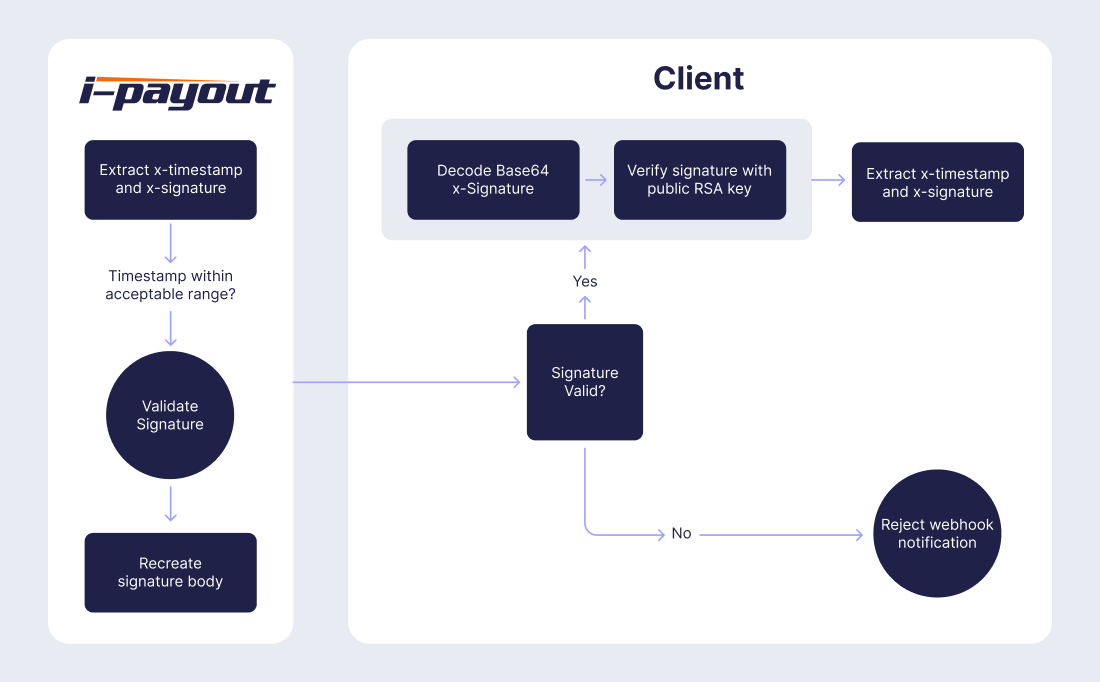
Webhook security for i-payout involves using digital signatures to ensure the authenticity and integrity of the webhook notifications. This process involves signing the webhook payload with a private key and verifying the signature using a public key.
### Key Components
#### Headers
* **x-timestamp**: This is the current Unix timestamp (number of seconds since epoch) when the webhook notification is sent. It ensures the request's freshness and helps prevent replay attacks.
* **x-signature**: This is the message's signature, created using the private RSA key and the SHA256 hash of the SignatureBody. It is Base64 encoded.
### SignatureBody
The format of the SignatureBody is:
```
timestamp + "#" + NotificationUrl + "#" + JsonBody
```
* **timestamp**: The Unix timestamp.
* **NotificationUrl**: The URL to which the notification is sent.
* **JsonBody**: The JSON payload of the webhook notification.
### Signature Generation
The SignatureBody is signed using the private RSA key and SHA256 hash algorithm to create the signature. The signature is then Base64 encoded and included in the x-signature header.
### Signature Verification
The client (receiver of the webhook) needs to use the public RSA key to verify the signature. The client constructs the SignatureBody in the same format, computes the SHA256 hash, and verifies it against the decoded signature using the public key.
### Public Keys
i-payout utilizes the POST HTTP method and JSON payloads to send requests to your webhook URL.
| Environment | Key |
| :--------------------- | :------------------------------------------------------------------------------------------------------------------------------------------------------------------------------------------------------------------------------------------------------------------------------------------------------------------------------------------------------------------------------------------------------- |
| Sandbox environment | MIIBITANBgkqhkiG9w0BAQEFAAOCAQ4AMIIBCQKCAQBkijC/ALAtltCudY48ONLIC7iwjaKFb7SCACzRLvU6QcPvtN0SpnbVhMDpvmQJzQFoVqDc6f4IugPo/aG5MzrBS40lArFRP29+kPpKqhYftKWXf/DusTd++l592PT/G6QUUc2Leu4N10YRLOTJyy+mY1iaQNBjx5h64Az7vpQx4fG2MPi4LB+ondRYL5B/dWniigyn5dKZ9mcffr5ji1gmyg+43I+HSJGtXjwjDJ2GDzXqu4XuSUmJunlpuGxMlYarlUrGWAqBLb0DkNc05KCtJHvRTtM2sa60u+rtcWXke2zjcs7/jxHoP8E2SsD5gueWnv4LKlXzl0dw9sC29emNAgMBAAE= |
| Production environment | MIIBIjANBgkqhkiG9w0BAQEFAAOCAQ8AMIIBCgKCAQEAvwjf5rn5EHGMkEYa7sfNhWpmqw9m51YXeWkOR2FvqegSyXlM4DPgxtjeNATxPyKCO6H2hgWbRRqT4ASC9RlEe1jPDkmZuuCOPi6TXlMlvBryNnzi5wkMuu3pOoO8HP3Pd/hpI2VaIoyIHe/poHtbwUJk05E6kjQCoUwHhA5zLxOPCP/WO8s2p8u9T1Zw1X1NhTyWH8AWsg5yVUruQiUD9qThxJvXIxn1ZUrtGs3fQbjiaUOad/PR9VRV/g9RR9QL1TM+pagSVmh1VyFmffCHJbIinR3gPr/Ff4a/kOMw3dHi+xKESSIxVAMiPkXoOopoLLKmvF0Rr7Ht+VZ9kYmNXQIDAQAB |
By following this security model, you can ensure that the webhook notifications you receive are authentic and tamper-proof. This provides a secure method for keeping your system updated with real-time events.